Summary:
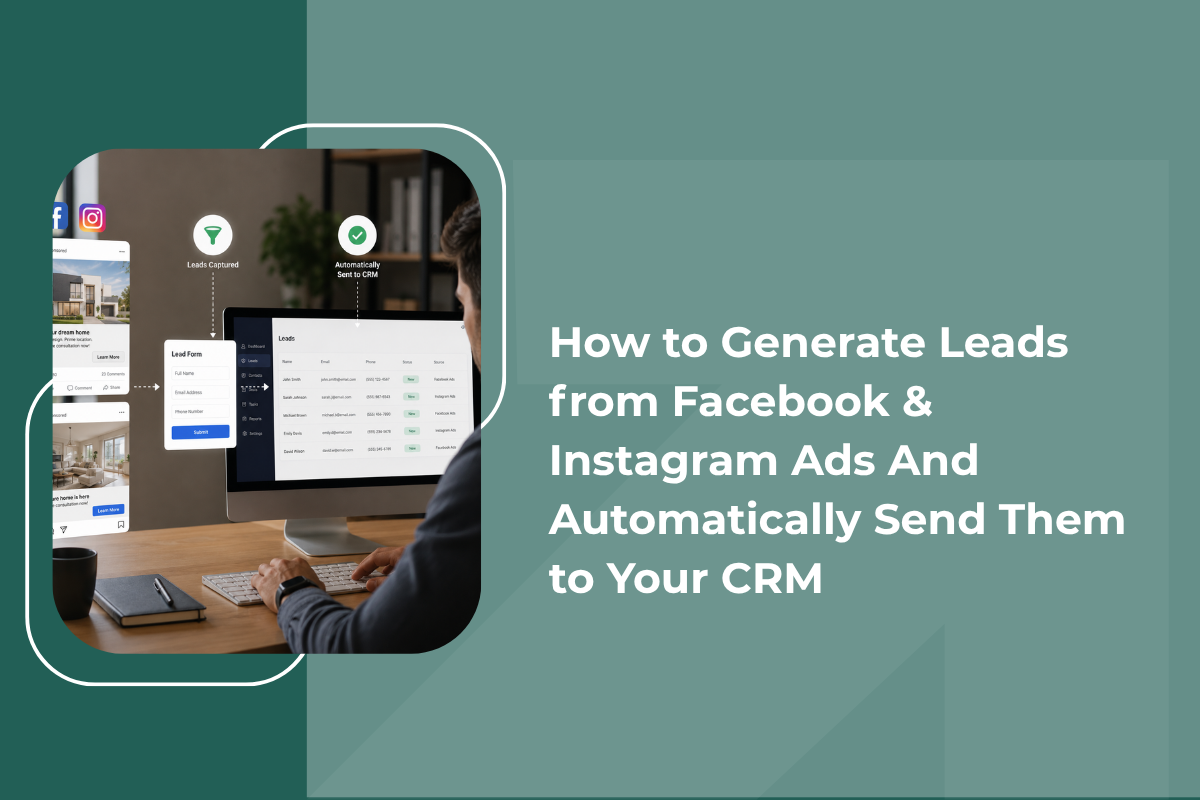
Facebook and Instagram Lead Ads offer a streamlined way to capture leads directly within the apps, eliminating the need for users to visit external websites. However, the challenge lies in managing these leads efficiently post-capture. Automating the integration of leads into a CRM system is crucial for immediate follow-up and effective lead management. By ensuring leads are instantly synced with a CRM, businesses can enhance response times, improve lead quality, and ultimately convert more leads into sales.
Table of Contents
Why Facebook & Instagram Lead Ads Work So Well
How to Generate Leads in Facebook: Step by Step
Instagram Lead Generation: What's Slightly Different
The Real Problem: What Happens After the Lead Comes In
Connecting Facebook Leads to Your CRM
Why Automatic Sync Actually Matters
Facebook and Instagram ads have become one of the fastest ways to get a steady stream of leads without needing a website visitor to actually click through anywhere. A person scrolling their feed can fill out a form in seconds, right inside the app, and just like that, a new lead lands in your business's hands.
The problem most businesses run into is not generating these leads, it is what happens right after. Leads sit inside Facebook's own dashboard, someone has to manually download them, and by the time a salesperson actually calls, the enquiry is already hours or even a day old. This guide walks through how to generate leads properly from both platforms, and just as importantly, how to make sure they land directly in your CRM the moment they come in.
Why Facebook & Instagram Lead Ads Work So Well
Both platforms offer a format called Lead Ads, which lets someone submit their details, name, phone number, email, without ever leaving the app. There's no separate landing page to load, no extra steps, and the form auto-fills with information already saved in their profile. This removes almost all the friction that normally causes people to abandon a form halfway through.
For instagram lead generation specifically, this format works particularly well because Instagram's audience tends to be highly visual and mobile-first, a quick, native form fits naturally into how people already use the app, compared to being redirected to an external website.
How to Generate Leads in Facebook: Step by Step
1. Set clear campaign objective - When creating a campaign in Meta Ads Manager, choosing the "Leads" objective tells the platform to optimize delivery toward people likely to fill out a form, rather than just people likely to click.
2. Build a simple, short lead form - The fewer fields you ask for, the higher your completion rate. Name, phone number, and one qualifying question is usually enough, every extra field reduces the number of people who finish filling it out.
3. Add a qualifying question - A single question like "What's your budget range?" or "When are you looking to buy?" can help filter serious enquiries from casual ones before a salesperson even makes the first call.
4. Target the right audience - Use interest-based targeting, lookalike audiences based on your existing customers, or retargeting for people who've already engaged with your page or profile, this consistently produces better lead quality than broad, untargeted campaigns.
5. Test creative and copy variations - Running two or three ad variations side by side helps identify which image, video, or headline actually drives the most form completions, rather than guessing.
This process for how to generate leads in facebook applies almost identically on Instagram, since both platforms share the same Ads Manager and lead form infrastructure.
Instagram Lead Generation: What's Slightly Different
While the setup process is largely shared with Facebook, a few things matter specifically for instagram lead generation ads:
- Vertical, video-first creative tends to outperform static images, since it matches how people naturally scroll through Reels and Stories
- Placing ads within Stories and Reels, not just the main feed, often produces stronger engagement for younger or mobile-first audiences
- Keeping the form short matters even more here, since Instagram users are typically moving through content quickly and have less patience for longer forms
The Real Problem: What Happens After the Lead Comes In
Here's where most businesses lose the advantage they just built. Without proper Lead Management Software in place, once someone submits a lead form, it sits inside Meta's own dashboard. Someone has to log in, manually export a spreadsheet, and share it with the sales team, often once or twice a day rather than in real time.
This delay directly works against everything discussed earlier. A lead who filled out a form in ten seconds, expecting a quick response, instead waits hours or a full day before anyone calls them. By then, much of their initial interest has already faded, and they may have already engaged with a competitor's ad in the meantime.
Connecting Facebook Leads to Your CRM
This is where automating the connection between your ad account and your CRM becomes essential. Setting up a proper facebook leads to crm flow typically works one of a few ways:
1. Native CRM integrations - Many CRMs offer a direct, built-in connection to Meta's Lead Ads, where new form submissions sync automatically within seconds, no manual export required.
2. Automation platforms - CRM Automation Software or third-party automation connectors can bridge Facebook Lead Ads with a CRM that does not have a native integration, triggering an instant sync whenever a new lead comes in.
3. Webhook-based setup - For more technical teams, Meta's Lead Ads API can be connected directly via a webhook, pushing new leads into a CRM the moment they're submitted, without any third-party tool in between.
Whichever method you choose, the goal is the same: eliminate the manual export step entirely, so a lead moves from ad click to CRM entry in seconds rather than hours.
Why Automatic Sync Actually Matters
Beyond simply saving time, connecting Facebook and Instagram leads directly into your sales CRM software changes what's actually possible with the leads you are generating::
- Instant follow-up becomes possible, since the sales team is notified the moment a lead arrives rather than checking a dashboard periodically
- No leads get lost in a spreadsheet export that someone forgot to share that day
- Lead source tracking happens automatically, so you know exactly which ad, audience, or creative produced each lead
- Duplicate detection prevents the same person from being logged twice if they filled out more than one form
- Faster reporting on cost per lead and conversion rate, since the data updates in real time instead of requiring manual reconciliation
Best Practices for Better Lead Quality
Generating a high volume of leads means little if most of them are low-intent, a challenge a real estate CRM often deals with directly, given how many browsers versus serious buyers fill out property enquiry forms. A few practices help improve overall quality:
- Add at least one qualifying question directly in the lead form
- Retarget people who've already shown interest, rather than only running cold campaigns
- Review lead quality weekly and adjust targeting based on which audiences convert best
- Make sure the sales team follows up within minutes, not hours, once leads start syncing automatically
Final Thoughts
Facebook and Instagram Lead Ads make it easier than ever to capture interest directly inside the apps people already use every day. But the real advantage only shows up once those leads move instantly into a system your sales team can act on, not sitting in a dashboard waiting to be manually exported.
Getting the ad setup right is half the job. Making sure every lead reaches your CRM the moment it is submitted is what actually turns that traffic into closed deals.